 Apple Boot Camp 3.2
Apple Boot Camp allows users with a Microsoft Windows XP installation disc to install Windows XP, Vista SP2, or 7 on an Intel-based Mac, and once installation is complete, users can restart their computer to run either Mac OS X or Windows XP or Vista.
Last update
25 Feb. 2015
Licence
Free
OS Support
Mac
Downloads
Total: 388,524 | Last week: 15
Ranking
#10 in
System Utilities
Publisher
Apple Inc.
Screenshots of Apple Boot Camp



Apple Boot Camp Editor's Review
Apple Boot Camp allows you to use multiple operating systems on a Intel-based Macintosh.This product has been designed in order to give you the possibility to install Microsoft Windows on your Macintosh, by using a multiple boot configuration. This version works with Windows XP SP2 and Windows Vista.
Besides these operating systems, Boot Camp can also handle a Linux installation, so its Boot Managing capabilities are quite good. Installing a Linux isn't supported by the application that you can find into this package, so if you would like to use a Linux distribution on your Mac, you need to read some How-Tos.
The distribution package of Boot Camp provides you the documentation and an installation package. The installation package places an application called Boot Camp Assistant into your /Applications/Utilities directory. It also adds a new Preference pane into the System Preferences.
The Boot Camp Assistant has just a few but important features. This is the application that can start the Windows installer, repartition your HDD, it can burn a Mac Windows Drivers disk, or it can restore the startup disk to a single volume.
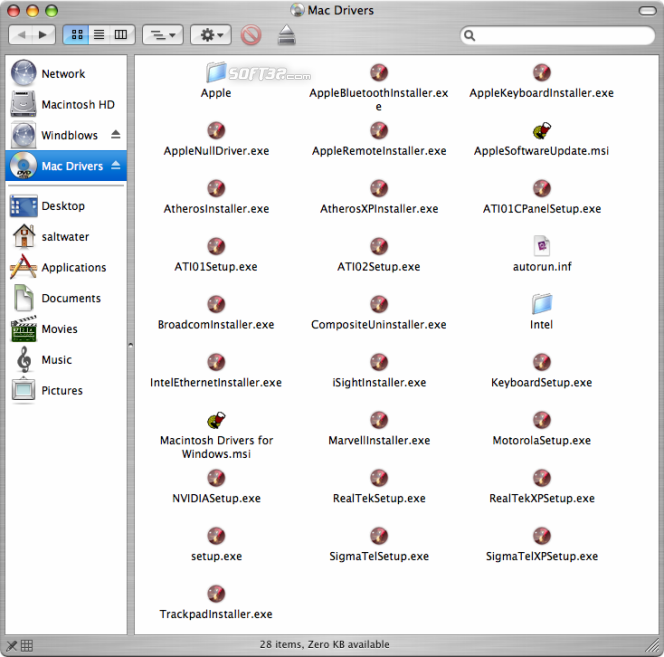
The Mac Windows Drivers disk is important after you finish the installation. It provides drivers for Mac-specific devices like: graphics interface, networking, soundboard, wireless networking (AirPort), bluetooth, the brightness control for the built in displays (MacBook, Mac Book Pro and iMac), and it also installs the Apple Keyboard support on Windows, including the 'Eject' key.
If you want to restart into the other OS, then you have multiple choices. Either you can select the system you want to boot from the Preference pane that the package installs into the System Preferences, or you can simply hold down the Option(Alt) key when the system starts up. A graphical boot menu appears so you can chose which OS your Mac should load.
Pluses: it gives you the possibility to install multiple operating systems on your Macintosh.
Drawbacks / flaws: this is still an immature project labeled as 'Beta', so it's highly recommended that you should not use this on production machines, unless you really know what you are doing and you are aware of the consequences.
In conclusion: this is one of those tools that makes useless the owning of a regular PC if you already have a Intel-based Macintosh.
version reviewed: 1.2 BETA
Apple Boot Camp Publisher's Description
Apple Boot Camp allows users with a Microsoft Windows XP installation disc to install Windows XP or Vista on an Intel-based Mac, and once installation is complete, users can restart their computer to run either Mac OS X or Windows XP or Vista. Boot Camp will be a feature in 'Leopard', Apple's next major release of Mac OS X, that will be previewed at
Read moreOther Languages
Look for Similar Items by Category
Feedback
- If you need help or have a question, contact us
- Would you like to update this product info?
- Is there any feedback you would like to provide? Click here
Popular Downloads
-
 Windows XP Service Pack 3
SP 3
Windows XP Service Pack 3
SP 3
-
 Mozilla Firefox
108.0...
Mozilla Firefox
108.0...
-
 Iggle Pop
1.0
Iggle Pop
1.0
-
 Minecraft
1.8.1
Minecraft
1.8.1
-
 Call of Duty 4: Modern Warfare
1.7.1
Call of Duty 4: Modern Warfare
1.7.1
-
 Opera browser
91.0.4516.65...
Opera browser
91.0.4516.65...
-
 Zuma Deluxe
1.0
Zuma Deluxe
1.0
-
 Antares Autotune VST
7.1.2...
Antares Autotune VST
7.1.2...
-
 Microsoft PowerPoint 2010
10.1.9
Microsoft PowerPoint 2010
10.1.9
-
 Outlook Express
5.0.6
Outlook Express
5.0.6
-
 Windows Live Movie Maker
6.5
Windows Live Movie Maker
6.5
-
 Windows Media Player
9.0
Windows Media Player
9.0
-
 7-Zip
1.7.1
7-Zip
1.7.1
-
 Safari
7.0.4
Safari
7.0.4
-
 Bitlord
2.3.2
Bitlord
2.3.2
-
 Adobe Illustrator
CC
Adobe Illustrator
CC
-
 WinRAR
6.11
WinRAR
6.11
-
 Adobe Photoshop Lightroom
5.6
Adobe Photoshop Lightroom
5.6
-
 BitTorrent
7.4.3...
BitTorrent
7.4.3...
-
 Windows 7 (SP1 included)
7
Windows 7 (SP1 included)
7